Watch out! If you pass imagesetstyle() an empty array as the second argument, it will crash your server!
I was messing with it just earlier and accidentally did so, and the page took a good minute to process, when my Apache server came up with the good ol' Windows 'Send Error Report' window.imagesetstyle
(PHP 4 >= 4.0.6, PHP 5, PHP 7, PHP 8)
imagesetstyle — Set the style for line drawing
Description
imagesetstyle() sets the style to be used by all
line drawing functions (such as imageline()
and imagepolygon()) when drawing with the special
color IMG_COLOR_STYLED or lines of images with color
IMG_COLOR_STYLEDBRUSHED.
Parameters
-
image A GdImage object, returned by one of the image creation functions, such as imagecreatetruecolor().
style-
An array of pixel colors. You can use the
IMG_COLOR_TRANSPARENTconstant to add a transparent pixel. Note thatstylemust not be an empty array.
Examples
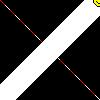
Following example script draws a dashed line from upper left to lower right corner of the canvas:
Example #1 imagesetstyle() example
<?php
header("Content-type: image/jpeg");
$im  = imagecreatetruecolor(100, 100);
$w   = imagecolorallocate($im, 255, 255, 255);
$red = imagecolorallocate($im, 255, 0, 0);

/* Draw a dashed line, 5 red pixels, 5 white pixels */
$style = array($red, $red, $red, $red, $red, $w, $w, $w, $w, $w);
imagesetstyle($im, $style);
imageline($im, 0, 0, 100, 100, IMG_COLOR_STYLED);

/* Draw a line of happy faces using imagesetbrush() with imagesetstyle */
$style = array($w, $w, $w, $w, $w, $w, $w, $w, $w, $w, $w, $w, $red);
imagesetstyle($im, $style);

$brush = imagecreatefrompng("http://www.libpng.org/pub/png/images/smile.happy.png");
$w2 = imagecolorallocate($brush, 255, 255, 255);
imagecolortransparent($brush, $w2);
imagesetbrush($im, $brush);
imageline($im, 100, 0, 0, 100, IMG_COLOR_STYLEDBRUSHED);

imagejpeg($im);
imagedestroy($im);
?>
The above example will output something similar to:
See Also
- imagesetbrush() - Set the brush image for line drawing
- imageline() - Draw a line
+add a note
User Contributed Notes 7 notes
Michael_Todd_335 at yahoo dot com 
16 years ago
dazbert 
7 years ago
To clarify, for lines where the thickness is greater than 1, the total length of the $style array needs to be an exact divisor of the length of the line.

This is because the pattern is repeated lengthways and wraps onto the second row of pixels, causing staggering to occur.

So if you have 5 red and 5 white pixels, and you want a line length of 55 pixels, either change the length to a multiple of 10, or change the dashes to, say, 6 red and 5 white.
Anonymous 
11 years ago
a shortcut for basic dashed lines, making it easy to adjust the lengths:

<?php

$length1 = 20;
$length2 = 10;
$style = array_merge(array_fill(0, $length1, $red), array_fill(0, $length2, $w));
imagesetstyle($im, $style);

?>
Wander 
16 years ago
Function to make a line with random fading:

<?php
    function fading_line($img,$sx,$sy,$ex,$ey){
        $r=rand(0,5);$g=rand(0,5);$b=rand(0,5);
        $l=sqrt((($ex-$sx)*($ex-$sx))+(($ey-$sy)*($ey-$sy)));
        for($i=0;$i<$l;$i++){
            $a = array(255-((255/$l)*$i), 255,0,(255/$l)*$i/2,(255/$l)*$i,(255-((255/$l)*$i))/2);
            $style[]=imagecolorallocate($img,$a[$r],$a[$g],$a[$b]);
        }
        imagesetstyle($img,$style);
        imageline($img,$sx,$sy,$ex,$ey,IMG_COLOR_STYLED);
    }

    fading_line($img,10,20,490,40);    // image, start x, start y, end x, end y
?>
Cruz at FtUC dot net 
18 years ago
When lines drawn with imagesetstyle seem to produce a thin white line only, make sure antialiasing is disabled.

<?
  imageantialias($im, false);
  $style = array($gridxcolor, $gridxcolor, IMG_COLOR_TRANSPARENT, IMG_COLOR_TRANSPARENT);
  imagesetstyle($im, $style);
  imageline($im, $x, 0, $x, $ymax+5, IMG_COLOR_STYLED);
  imageantialias($im, true);
?>

Setstyle and Antialias don't go together.
php at imperium dot be 
13 years ago
Be aware that styles are applied towards the width of the line instead of linear.

To convert a style to be used for thick lines you can use the function below:


<?php

/*

ImageStyleThicken(<aStyle>,<iThickness>) --> <aThickStyle>


<aStyle> is the style array for a thickness of 1 (see imagesetstyle()).

<iThickness> is the new thickness to apply (see imagesetthickness()).


<aThickStyle> is the style array suitable for the given thickness.

*/

function ImageStyleThicken($_1,$_2) {

    $a = array();

    foreach ($_1 as $x) {

        $i = $_2;

        do $a[] = $x; while (--$i>0); }

    return $a;

}

?>
zackbloom at gmail dot com 
18 years ago
Use this to set the style to any combination of pixels.
You can pass as many modifiers as you wish.
Use the format [num]r[red]g[green]b[blue].

For example:

$im=dashed($im,"4r255g0b0","2r0g255b0","5r0g0b255");
imageline($im, 0, 0, 600, 600, IMG_COLOR_STYLED);

function dashed($im){
$size = func_num_args();
for($i = 0; $i < $size; $i++){
$arg = func_get_arg($i);
if(!is_resource($arg)){
$r=substr($arg,strpos($arg,"r")+1,
strpos($arg,"g")-strpos($arg,"r")-1);
$g=substr($arg,strpos($arg,"g")+1,
strpos($arg,"b")-strpos($arg,"g")-1);
$b=substr($arg,strpos($arg,"b")+1,
strlen($arg)-strpos($arg,"b"));
$color = imagecolorallocate($im,$r,$g,$b);
$x = substr($arg,0,strpos($arg,"r"));
$vals[$i] = array_fill(0,$x,$color);
}
}
for($k=0;$k<count($vals)+1;$k++)
if(array_key_exists($k,$vals)) $prop=array_merge($prop,$vals[$k]);
imagesetstyle($im, $prop);
return $im;
}